Introducing Sailfish: Your MySQL performance_schema, Charted Over Time
· 9 min read · Boring Observability
Verified against MySQL 8.0 · Laravel 13
MySQL's performance_schema counts nearly everything your database does: rows read through each index, rows read by full scans on each table, lock waits, errors, transactions. It hands each count back as one running total. Sailfish is a Laravel package that reads those totals every five minutes and draws them over time, so you can see when something changed and what it looked like before.
This post walks through what the dashboard at /sailfish shows, page by page, then how the charts are
built and what Sailfish needs from your server.
A line instead of a number#
Ask performance_schema how many rows have been read from orders by full scans and it gives you one
number, everything since the server started. An hour of scans yesterday afternoon is in that number, added to
weeks of ordinary traffic, with nothing to say when it happened or that it was unusual. Querying again later gives a
bigger number and the same problem.
A spike only shows up as the difference between two readings taken close together, on either side of it. Read the counter in the morning and again in the evening, and a 40-minute burst between them looks like a slightly busier day. The questions people actually ask are all about that shape:
- When did this index stop being read, and can we drop it?
- Did full scans on
ordersstart after Tuesday's deploy, or have they always been there? - Is this many lock wait timeouts normal for a Monday afternoon?
- Which table grew by 40 GB last month?
Sailfish takes those readings every five minutes and keeps the difference between each pair, so every page of the dashboard is a chart with weeks behind it.
Each index, read by read#
Every index gets a chart of rows read and written through it, and a status worked out from that chart: hot, cold (read in the two weeks before the last seven days and not since), never used (no read in 30 days), or dropped. The index list sorts by it, and each index page says whether another index already covers it. Primary and unique keys are hidden unless you ask, since they enforce a constraint whether or not anything reads them.
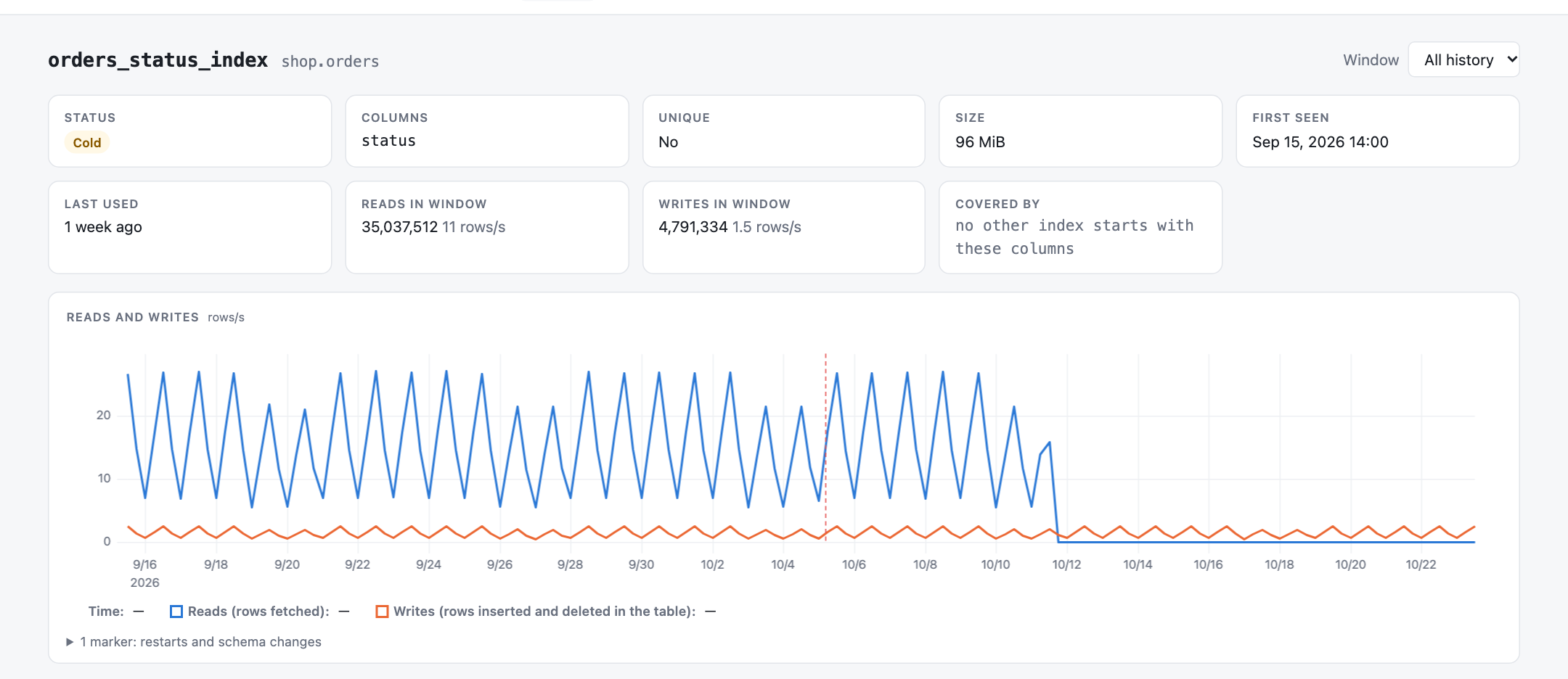
In a total, that index looks as busy as any other, because the reads from before it went quiet are still counted. On the chart it is a line that drops to zero and stays there.
Index reads against full scans#
Each table page draws two lines: rows fetched through an index and rows read by full scans, with the reads split by index underneath. Schema changes are marked on the time axis. When a migration drops an index that a query depended on, the scan line climbs at the marker while that index's line ends.
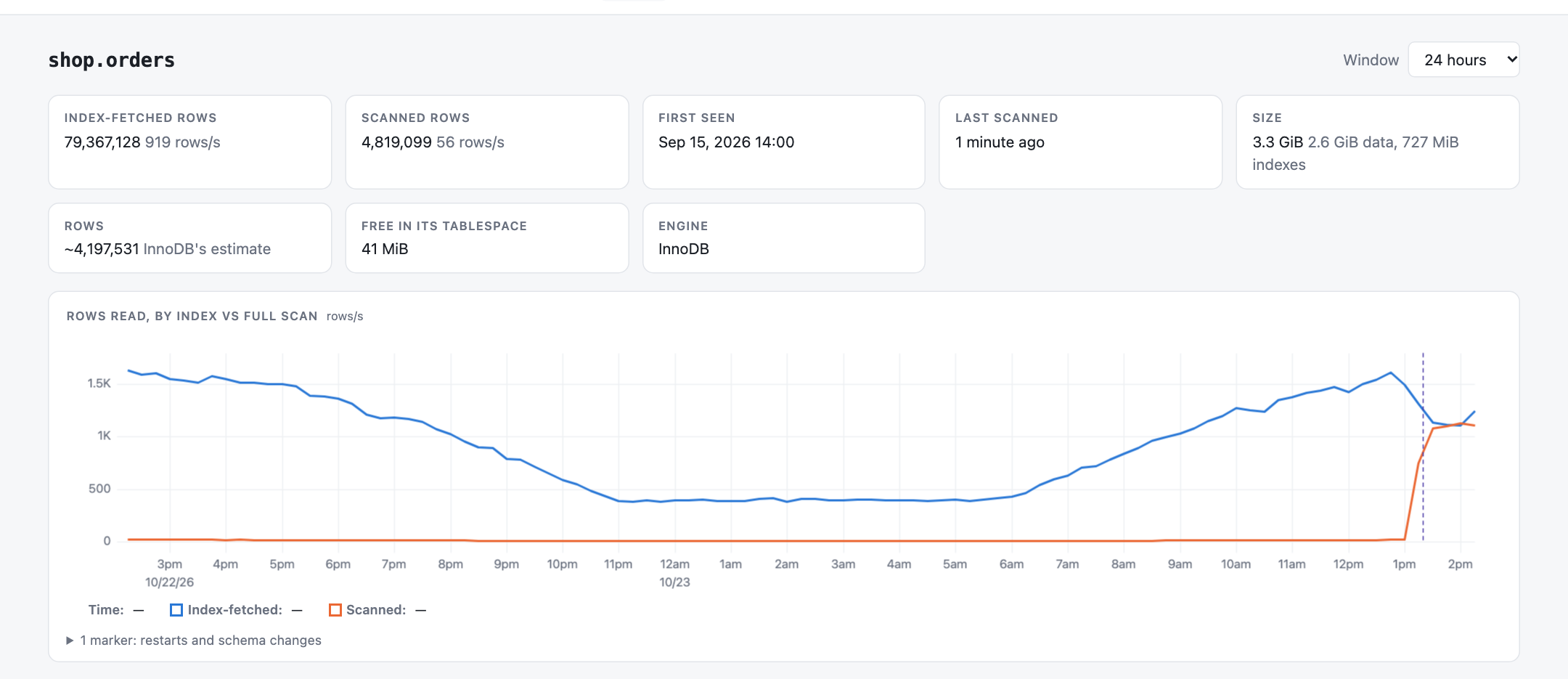
orders_shipped_at_index.The same page charts time spent waiting for table locks, and the table's size and row count, read once a day. That daily reading is where a table growing faster than usual shows up.
The server across weeks#
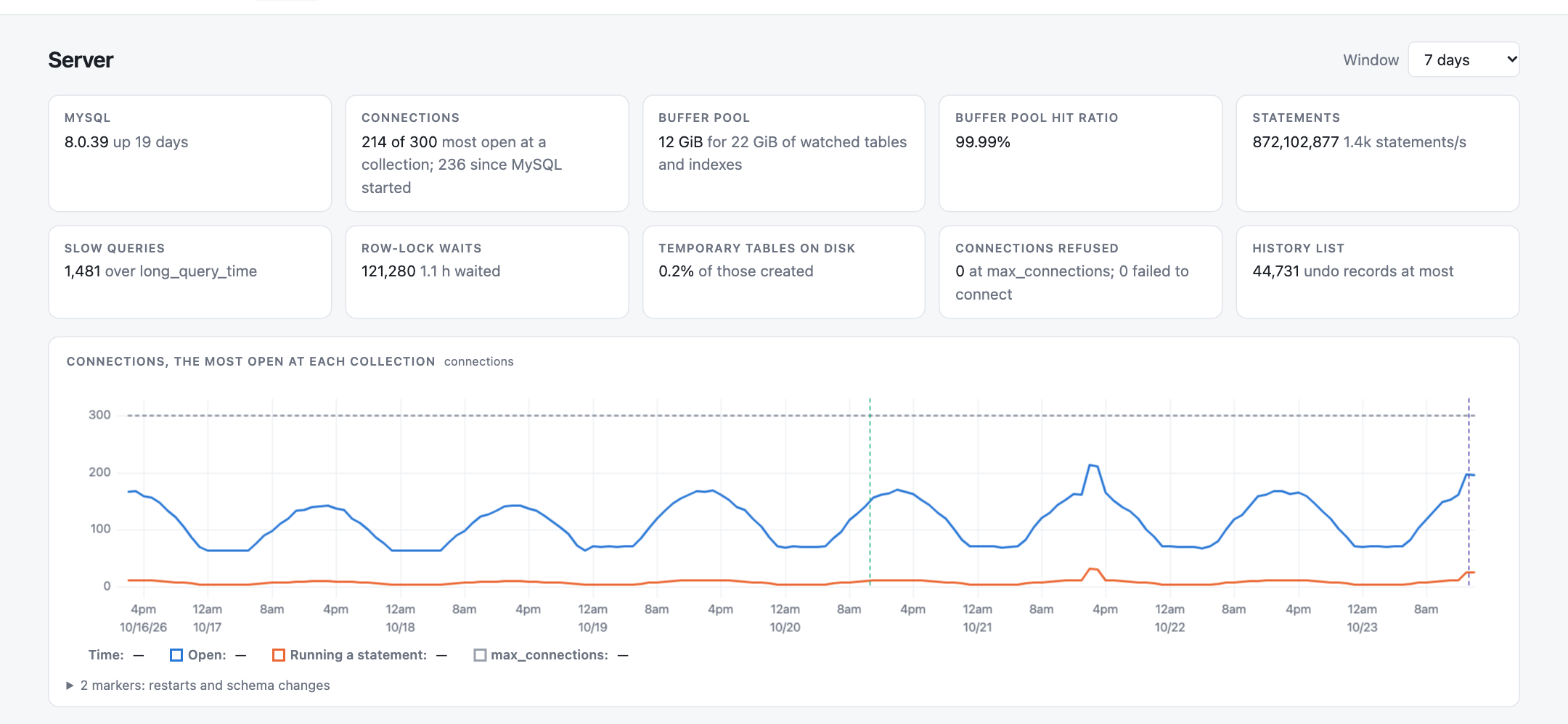
The Server page charts connections against max_connections, statements by type, time spent waiting
for row locks, buffer pool misses, temporary tables and sorts that spilled to disk, and InnoDB's history list
length. A week on one chart is usually enough to see what a normal Tuesday looks like and where this one differs.
Transactions after they finish#
The Transactions page picks transactions up once they have finished. Every collection reads the transactions that ended since the previous one, and the page charts how many committed against how many rolled back, with the share rolled back as its own line. A deadlock storm or a request failing halfway through shows up as a spike in that line.
Under the charts are the long ones: every transaction that ran for at least five seconds, slowest first, with how long it ran, whether it committed, how many statements it ran, its isolation level, and the account and program that ran it. The text of its statements is never stored.
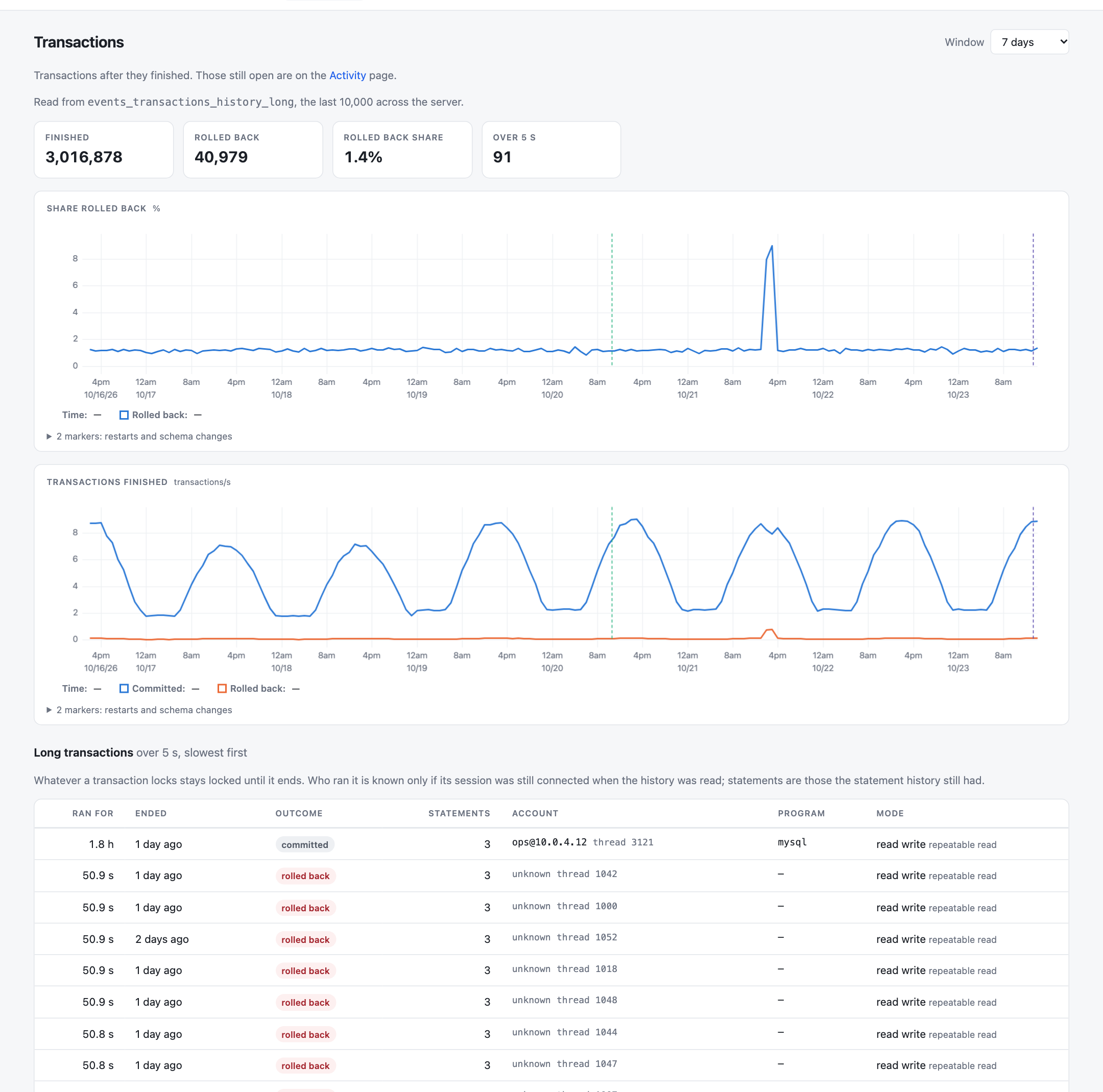
Out of the box MySQL keeps only the last 10 transactions of each session, and drops them when the session
disconnects. The page says when that is what it read, and turning on events_transactions_history_long
lets it count every one.
And what is happening right now#
One page is live instead of historical. Activity is read when you open it and never stored. It draws who is
blocking whom as a tree rooted at the session everyone is waiting on, so an ALTER TABLE stuck behind an
idle transaction appears with every query queued behind the ALTER. Under each open transaction it lists
the statements it has run, with the one that took the row locks marked, and a running ALTER TABLE gets
a progress bar.
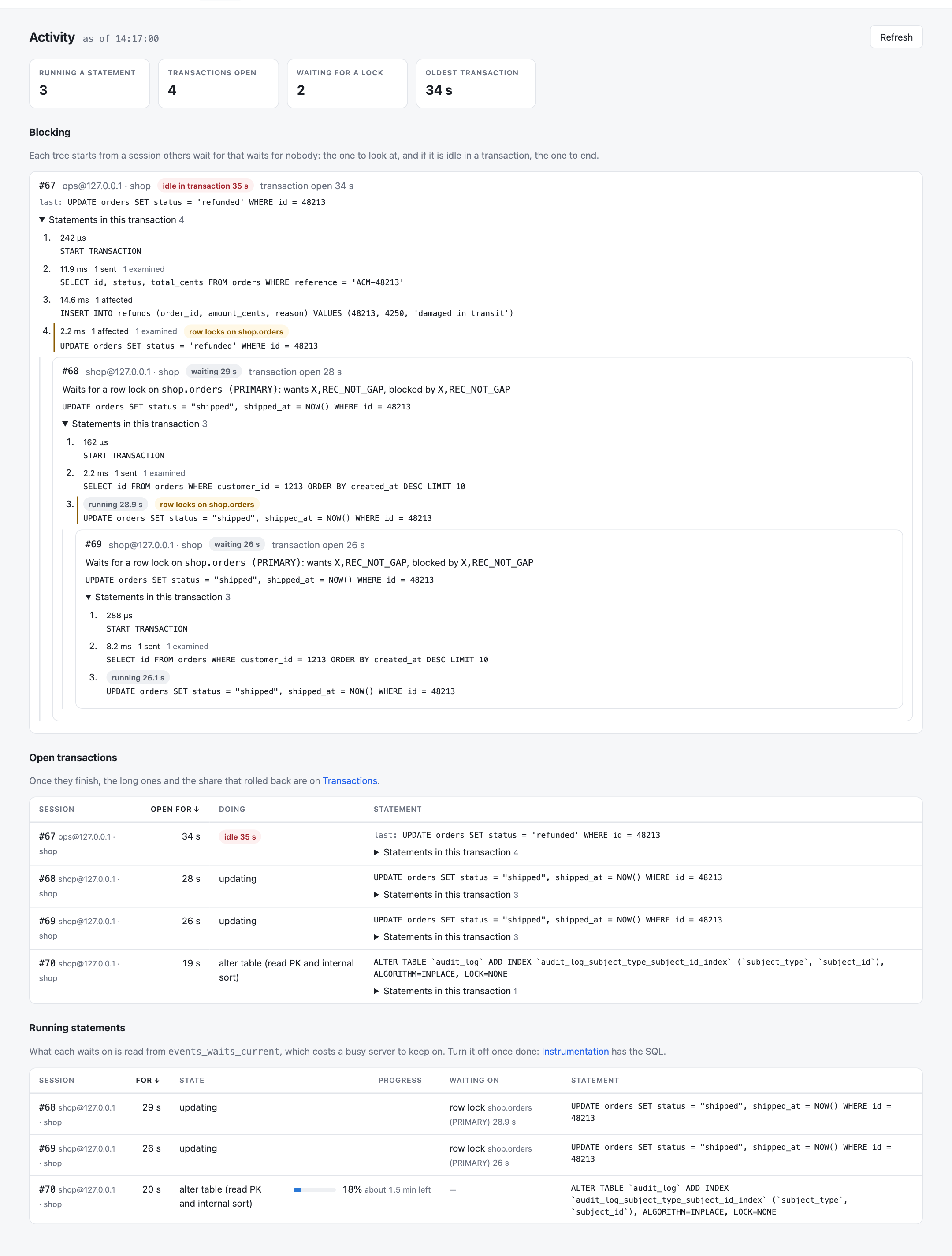
Statement text here can contain email addresses and tokens. Everyone who can open the dashboard sees it with the
literals replaced by ?, and a second gate, viewSailfishQueryText, decides who sees it as
sent.
When the shape changes#
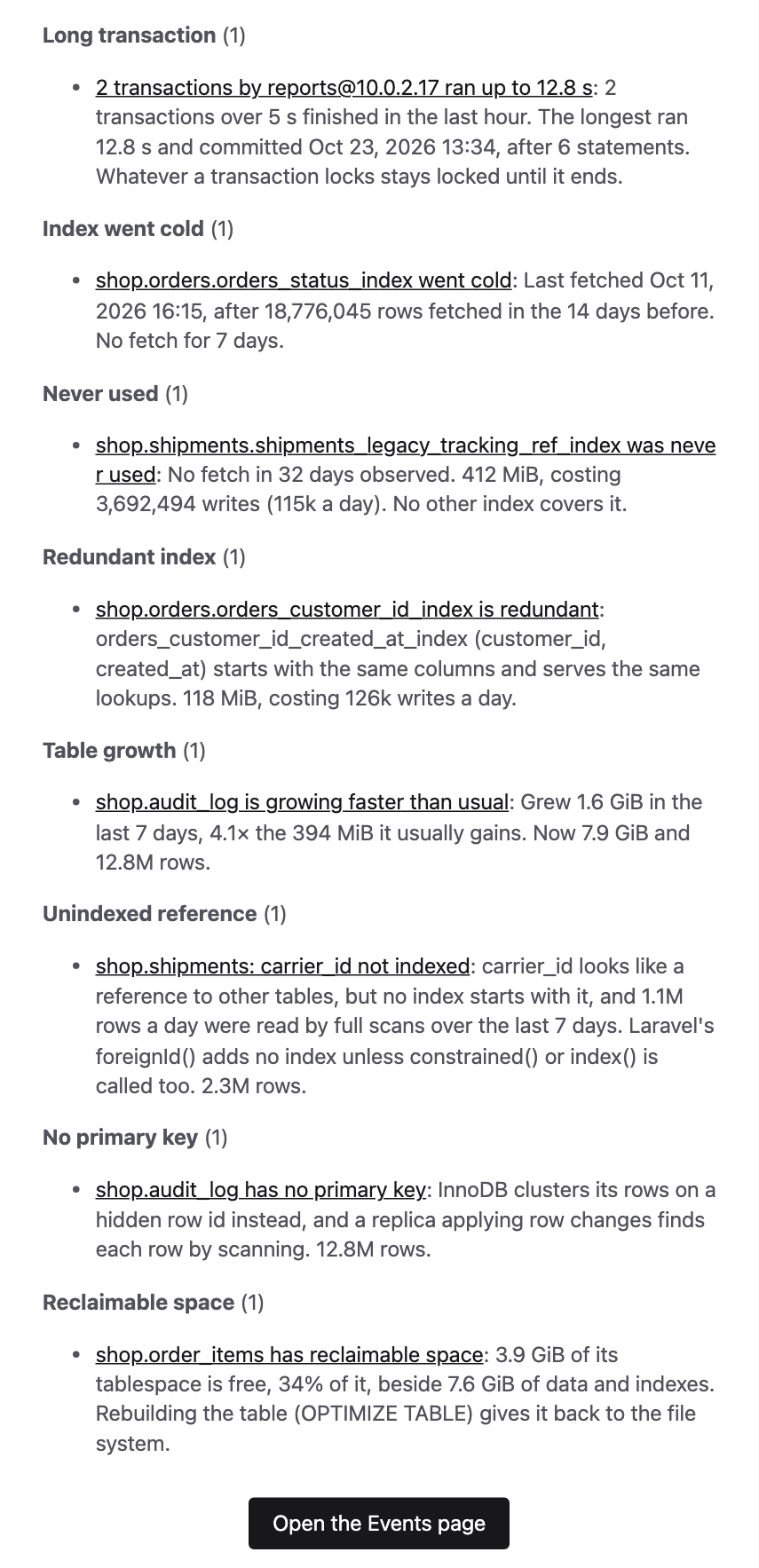
A chart only helps if someone looks at it. Eighteen detectors read the same history and open an event when it changes, keep it open while the change lasts, and resolve it when it clears. The surges compare the last hour with the same hour over the previous week, so a busy Monday morning is measured against other Monday mornings and a traffic peak alone stays quiet.
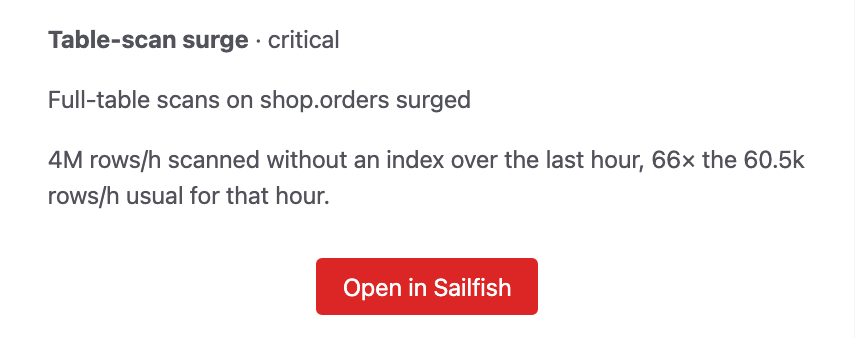
Surges in table scans, row-lock waits, slow queries, errors and rollbacks are sent as they open, as are connections
running out and a history list that keeps growing. The slower findings go into a digest at 09:00: indexes that went
cold, were never used or are made redundant by another, tables growing faster than usual, *_id columns
no index starts with, long transactions and schema changes.
Mail and Slack are built in, and a JSON webhook covers anything else. Each severity can have its own channels. An open immediate event is sent again every six hours until someone acknowledges it, and a recovery goes out when it clears. The events reference has every threshold.
How the charts are built#
Sailfish schedules sailfish:collect every five minutes on the Laravel scheduler you already run. Each
collection reads performance_schema in one pass over your application's database connection and stores what moved
since the previous one in sailfish_* tables next to your own. Every point on a chart is a rate over the
seconds its snapshot covers, so a collection that ran late after a gap spreads over the hours it covers instead of
drawing a spike.
MySQL restarts are marked on the charts, and the lines carry on through them: Sailfish sees the server's uptime go backwards and measures the next reading from zero. Five-minute points are kept for a week, hourly ones for 90 days and daily ones after that, so a 30-day chart is as quick to draw as a one-hour one. Dropped tables and indexes keep their charts.
Once Composer can reach the private registry, installing it is two commands:
composer require boring-o11y/my-sailfish
php artisan migrate
It needs MySQL 8.0, Laravel 12 or 13, PHP 8.4, and a database user that can SELECT from
performance_schema. The dashboard answers without a login in the local environment only. Everywhere
else, the viewSailfish gate decides who can open it. The
installation guide has the registry setup and the
two optional grants.
What your server records#
Stock MySQL records everything the charts need. A few extras, such as what a running statement waits on and every
finished transaction, depend on consumers it ships switched off. The Instrumentation page lists each part of
Sailfish with what it needs and whether it is on, and gives the UPDATE and the my.cnf line
for anything that is off. Sailfish never changes the setup itself.
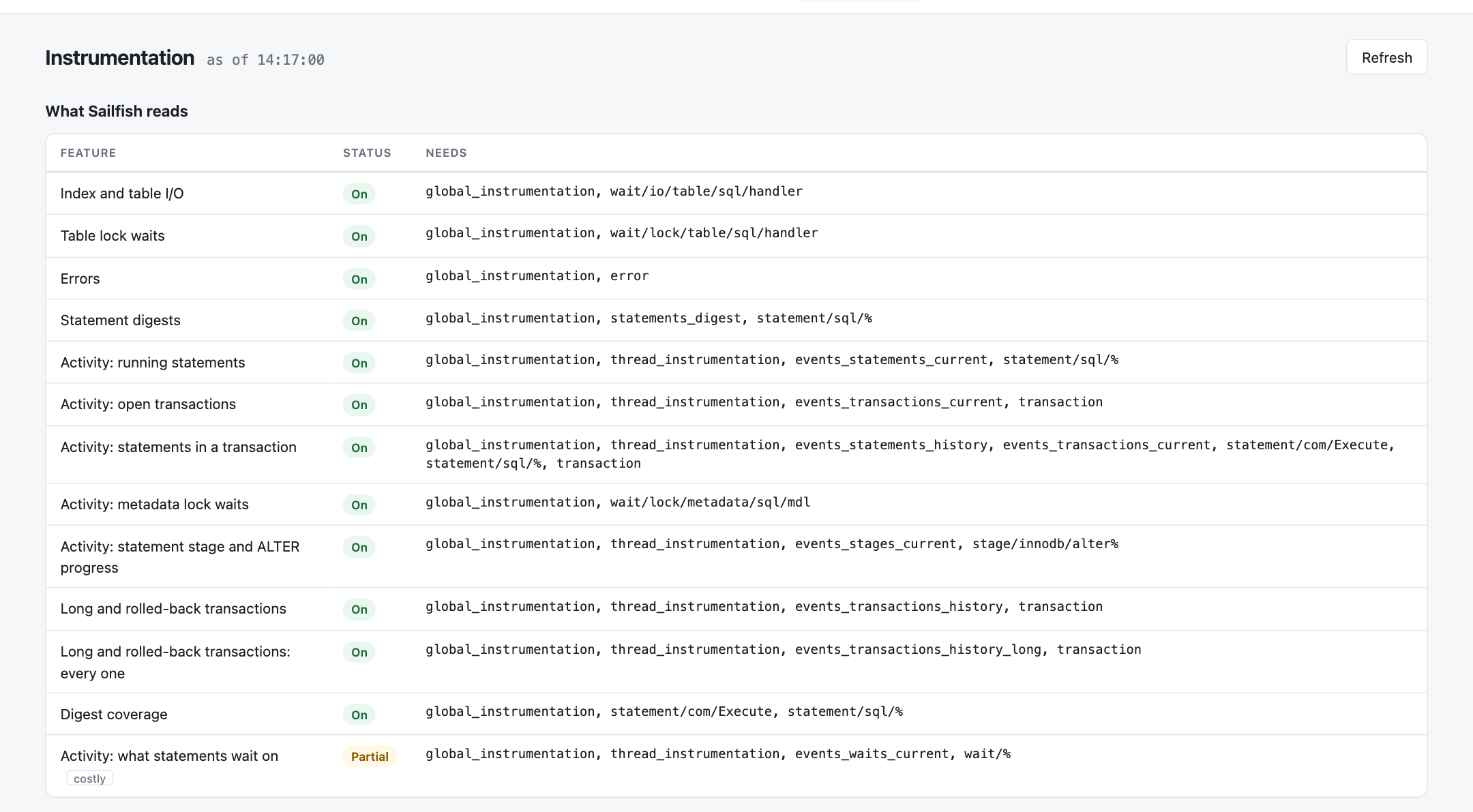
It also shows one MySQL behaviour that catches most Laravel apps. Statements sent through the binary
prepared-statement protocol get no digest, and Laravel's MySQL connection uses native prepared statements by
default, so the statement digest pages stay nearly empty on the defaults. The index and table charts are
unaffected. The statement digests page has the
one-line fix, PDO::ATTR_EMULATE_PREPARES => true. Before installing, the free
performance_schema checker tells you whether a tuned
server has switched anything off.
The charts start with the first snapshot#
Every line begins when Sailfish is installed. The first day already has shapes to look at, and the comparisons build up behind them: surges need a week of the same hour, and a never-used index needs 30 days. Until then the dashboard says how many more days each one needs.
The documentation covers configuration, notifications and what each table records.
Frequently asked questions
Why can't I see a spike in full table scans from performance_schema?
Because its counters are running totals since the server started. A query returns the sum, so an hour of scans yesterday is added to weeks of ordinary traffic with nothing to say when it happened. A spike only shows as the difference between two readings taken close together on either side of it. Sailfish reads the counters every five minutes and charts the differences, so the spike appears as a line climbing at the time it started.
What does Sailfish need from MySQL?
MySQL 8.0 and a database user that can SELECT from performance_schema. SELECT on mysql.innodb_index_stats adds index sizes and PROCESS adds InnoDB's history list length; both are optional. Stock MySQL has every consumer and instrument it needs turned on.
Does Sailfish store query text?
Statement digests keep MySQL's normalised text, with literals replaced by placeholders, and the sample statement MySQL keeps for each digest, which the dashboard does not show. Long transactions are stored without the text of their statements. The Activity page is read live and never stored; it shows statements with their literals replaced by ? unless the viewSailfishQueryText gate allows the text as sent.
Why are my Laravel queries missing from MySQL's statement digests?
MySQL 8.0 gives no digest to statements sent through the binary prepared-statement protocol, and Laravel's MySQL connection uses native prepared statements by default. Setting PDO::ATTR_EMULATE_PREPARES to true in the connection's options sends them as text, and they get digests. Index and table counters see every statement either way.
Keep reading
12 min read
Dispatching Laravel Jobs After the Transaction Commits
Why Laravel jobs dispatched in a transaction can run before it commits, and how afterCommit and...
9 min read
Laravel Job Retries and Backoff with ShouldBeUnique and WithoutOverlapping
What ShouldBeUnique, ShouldBeUniqueUntilProcessing and WithoutOverlapping do while a Laravel job waits out its...
10 min read
Laravel Job Chains at Scale: Why the First Chain Finishes Last
Why hundreds of Laravel job chains run breadth-first, two ways to keep each chain in order without the wait,...
22 min read
Laravel Middleware: Requests, Queued Jobs and the HTTP Client
Laravel middleware for requests, queued jobs and the HTTP client: how it works, every built-in middleware, and...