whereDate() and Other Eloquent Calls That Quietly Skip Your MySQL Index
· 11 min read · Boring Observability
Verified against MySQL 8.0.46 · MySQL 8.4.13 · Laravel 13.40
Order::whereDate('created_at', $day) reads as if it narrows the query to one day. The SQL it sends
wraps created_at in a function, and MySQL answers it by reading every row in the table, index or no
index. Several other Eloquent calls do the same without any sign in the code. This post runs each one through
EXPLAIN and gives the Laravel rewrite that lets MySQL use the index again.
The examples run against an orders table of 1,000,002 rows spread over 22 months, about 1,480 a day,
built by a Laravel migration with indexes on created_at, email and
reference. MySQL 8.0 and 8.4 gave the same plans.
What a function around the column does#
Here is the query and what Laravel sends for it:
Order::whereDate('created_at', '2026-10-15')->get();

// select * from `orders` where date(`created_at`) = '2026-10-15'
The index on created_at is a sorted list of created_at values. It can find every value
between two timestamps quickly, because they sit next to each other. It holds nothing about
date(created_at), so MySQL has to compute that for each row and compare. EXPLAIN says so:
type  possible_keys  key   rows    Extra
ALL   NULL           NULL  993054  Using where
type: ALL is a full table scan, and possible_keys: NULL means MySQL found no index it
could use for this WHERE at all. The query read all 1,000,002 rows to return 1,482. On a laptop
that took between half a second and a second. The same day written as a range on the bare column read 1,482
index entries and took a few milliseconds.
The rule behind every section below: MySQL can use an index on a column when the column stands alone on one side of
the comparison. Wrap it in date(), year(), a JSON function or a type conversion, and the
index is out of reach.
Rewriting whereDate() as a range#
One day is every timestamp from midnight up to the next midnight. With whereBetween() and Carbon's
startOfDay() and endOfDay():
$day = Carbon::parse($date);

Order::whereBetween('created_at', [$day->copy()->startOfDay(), $day->copy()->endOfDay()])->get();

// select * from `orders` where `created_at` between '2026-10-15 00:00:00' and '2026-10-15 23:59:59'
type possible_keys key rows Extra
range orders_created_at_index orders_created_at_index 1482 Using index conditionIt returns the same 1,482 rows, read through the index. Two details in that snippet decide whether it works.
Why the copy() is there#
In a new Laravel 13 app, now(), today() and Carbon::parse() all return
mutable Carbon instances. startOfDay() and
endOfDay() change the object they are called on and return that same object. Without the copies:
$day = Carbon::parse('2026-10-15');

Order::whereBetween('created_at', [$day->startOfDay(), $day->endOfDay()])->get();

// select * from `orders` where `created_at` between '2026-10-15 23:59:59' and '2026-10-15 23:59:59'
Both array elements are one object. endOfDay() runs second and moves it to the end of the day, and
Laravel only turns the binding into a string when the query runs, so both bounds come out as
23:59:59. The query returns nothing. Its EXPLAIN is a perfect range scan reading one
row, so a plan review will not catch it either.
Use copy(), or CarbonImmutable, whose methods return a new object. To make every date in
the app immutable, call Date::use(CarbonImmutable::class) in a service provider's
boot(). After that now(), today() and Date::parse() all return
CarbonImmutable, and the snippet without copies binds the right bounds.
endOfDay() drops the fraction of a second#
endOfDay() is 23:59:59.999999, but Laravel formats bound dates as
Y-m-d H:i:s, so MySQL receives 23:59:59. On columns from $table->timestamps(),
which store whole seconds, that is the same thing. On a column declared with a precision, such as
$table->timestamp('paid_at', 6), a row at 23:59:59.4 falls outside the range:
whereDate() found two payments on the day and the whereBetween() above found one.
A half-open range has no last instant to get wrong. It takes rows from midnight, up to but not including the next midnight:
$day = CarbonImmutable::parse($date)->startOfDay();

Order::where('created_at', '>=', $day)
    ->where('created_at', '<', $day->addDay())
    ->get();

// select * from `orders` where `created_at` >= '2026-10-15 00:00:00' and `created_at` < '2026-10-16 00:00:00'
It reads the same 1,482 index entries, whatever the column's precision.
Every whereDate() operator, and whereToday()#
whereToday(), whereBeforeToday(), whereAfterToday() and the
OrBefore/OrAfter variants are built on whereDate(), so they send
date(created_at) = '2026-11-08' and scan the table too. wherePast(),
whereFuture() and whereNowOrPast() compare the bare column with now() and can
use the index.
With $d a CarbonImmutable, each call on the left returns the same rows as the
index-friendly version on the right:
| Instead of | Write |
|---|---|
whereDate('created_at', $d) | where('created_at', '>=', $d->startOfDay()) |
whereDate('created_at', '>=', $d) | where('created_at', '>=', $d->startOfDay()) |
whereDate('created_at', '>', $d) | where('created_at', '>=', $d->addDay()->startOfDay()) |
whereDate('created_at', '<=', $d) | where('created_at', '<', $d->addDay()->startOfDay()) |
whereDate('created_at', '<', $d) | where('created_at', '<', $d->startOfDay()) |
whereToday('created_at') | where('created_at', '>=', today()) |
whereBeforeToday('created_at') | where('created_at', '<', today()) |
whereTodayOrBefore('created_at') | where('created_at', '<', today()->addDay()) |
whereAfterToday('created_at') | where('created_at', '>=', today()->addDay()) |
whereTodayOrAfter('created_at') | where('created_at', '>=', today()) |
today() builds a new instance on every call, so today()->addDay() leaves the other bound
alone even when it is mutable.
whereYear() and whereMonth()#
These wrap the column in year() and month(), with the same result:
Order::whereYear('created_at', 2026)->whereMonth('created_at', 10)->get();

// select * from `orders` where year(`created_at`) = 2026 and month(`created_at`) = '10'
// type: ALL, possible_keys: NULL, 1,000,002 rows read for 45,865

$month = CarbonImmutable::create(2026, 10);

Order::where('created_at', '>=', $month)
    ->where('created_at', '<', $month->addMonth())
    ->get();

// select * from `orders` where `created_at` >= '2026-10-01 00:00:00' and `created_at` < '2026-11-01 00:00:00'
// type: range, key: orders_created_at_index, 45,865 index entries read
A year works the same way, with CarbonImmutable::create($year) and addYear(). On this
table the rewrite for 2025 did not change the plan: possible_keys listed
orders_created_at_index, but key stayed NULL and MySQL scanned anyway. 2025
holds 54% of the rows, and reading half a table through a secondary index costs more than reading it in order. That
was the optimizer weighing the index and turning it down, which is the right call. With year() it
never had the choice.
whereMonth() on its own, such as every December in every year, has no single range to rewrite into.
Nor do whereDay() and whereTime(). For those, index the expression.
When the query has to stay: index the expression#
MySQL 8.0.13 and later can index the result of an expression. Laravel has no column method for it, but
rawIndex() takes the expression as written:
Schema::table('orders', function (Blueprint $table) {
    $table->rawIndex('(date(created_at))', 'orders_created_date_index');
});
With that index in place, the unchanged whereDate('created_at', '2026-10-15') gets
type: ref on orders_created_date_index and reads 1,482 entries. It works on the
TIMESTAMP columns that timestamps() creates. (month(created_at)) does the
same for whereMonth().
A generated column does the same job and gives you a column to query by name:
$table->date('created_date')->virtualAs('date(created_at)')->index();
MySQL uses its index both for where('created_date', $day) and for the original
whereDate('created_at', $day), because the generated column's expression matches the one in the query.
That matching is literal, which matters for JSON columns below.
Each extra index is written on every insert and on every update to created_at, so this suits queries
you cannot change, such as one inside a package, or ones a range cannot express.
On MariaDB, Laravel's mariadb driver gets different results. MariaDB has no functional indexes, and
rawIndex('(date(created_at))') fails with a syntax error. It does not need one for this case:
MariaDB 11.1 and later rewrite date() and year() comparisons into ranges themselves, and
on 11.4 the plain whereDate() used orders_created_at_index. whereMonth()
still scanned there.
LIKE with a leading wildcard#
An index on email is sorted by its first character, then its second, and so on. A pattern with a fixed
start can use it, and a pattern that starts with % cannot, because the first character could be
anything:
Order::where('email', 'like', 'user4217@%')->get();
// type: range, key: orders_email_index, 20 entries read for 20 rows

Order::where('email', 'like', '%@acme.io')->get();
// type: ALL, possible_keys: NULL, 1,000,002 rows read
The search box version is the one most apps have: whereAny(['email', 'reference', 'customer_name'], 'like',
"%{$term}%"). That read the whole table on every search to return 400 rows.
whereLike() has a trap of its own. The default, case-insensitive call compiles to a plain
like and uses the index for a fixed prefix. Pass caseSensitive: true and it compiles to
like binary, which compares bytes against a column with a case-insensitive collation. MySQL then
scans even for 'user4217@%', and SHOW WARNINGS after the EXPLAIN says why:
Warning 1739: Cannot use range access on index 'orders_email_index' due to type or collation conversion on field 'email'What to do about a leading wildcard depends on what the search is for. A search on the end of a value, like an email domain, can move the part being searched into its own column:
$table->string('email_domain')->virtualAs("substring_index(email, '@', -1)")->index();

Order::where('email_domain', 'acme.io')->get();
For words inside text, a FULLTEXT index and whereFullText() give
type: fulltext:
$table->fullText('customer_name');

Order::whereFullText('customer_name', 'okafor')->get();
Full-text search matches whole words, which changes the results. 'okafor' found the same 142,857 rows
as like '%okafor%'. 'oka' found none, where like '%oka%' found all of them.
For substring search across columns at any volume, a search engine through Laravel Scout is the usual answer.
A number compared with a string column#
This one has no function in the SQL at all. reference is a VARCHAR holding values like
100042:
Order::where('reference', 100042)->get();
// select * from `orders` where `reference` = 100042
// type: ALL, possible_keys: orders_reference_index, key: NULL, 1,000,002 rows read

Order::where('reference', '100042')->get();
// type: ref, key: orders_reference_index, 1 entry read
Laravel binds a PHP integer as an integer. When MySQL compares a string column with a number, it compares them as numbers, converting each row's string, and a sorted list of strings is no help in finding a number. The warning:
Warning 1739: Cannot use ref access on index 'orders_reference_index' due to type or collation conversion on field 'reference'
The results change too. Compared as a number, 100042 matched three rows: 100042,
0100042 and 100042-B, whose leading digits convert to the same number. The string
matched one.
The integer usually comes from a JSON request. For a body of {"reference": 100042},
$request->input('reference') is an int, while the same field from a form or a query
string is a string. IDs in webhook payloads arrive the same way. Cast where the value comes in:
Order::where('reference', (string) $request->input('reference'))->first();

Order::whereIn('reference', array_map('strval', $references))->get();
whereIn() with integers scans in the same way. The other direction is safe:
where('user_id', '4217') against a BIGINT column converts the one string to a number
and uses the index.
JSON columns#
Laravel's arrow syntax for JSON compiles to a function call on the column:
Order::where('options->channel', 'pos')->get();

// select * from `orders` where json_unquote(json_extract(`options`, '$."channel"')) = 'pos'
// type: ALL, possible_keys: NULL
The fix is an indexed generated column, and the catch is the literal matching from earlier. The MySQL manual
writes the path with the ->> shorthand, options->>'$.channel'. MySQL stores
that as '$.channel', Laravel sends '$."channel"', and the two do not match. A generated
column or functional index written that way left where('options->channel', ...) scanning the table.
Build the expression from Laravel's own grammar instead, and it matches whatever the query builder sends:
use Illuminate\Support\Facades\DB;

Schema::table('orders', function (Blueprint $table) {
    $table->string('channel', 10)
        ->virtualAs(DB::getQueryGrammar()->wrap('options->channel'))
        ->index();
});
Now the unchanged where('options->channel', 'pos') uses orders_channel_index, and so does
where('channel', 'pos'). The column's collation made no difference to the match. On MariaDB, Laravel
sends json_value() for the same path, and 11.4 did not use a generated column's index for it.
Reading EXPLAIN for these#
explain() on any query builder runs EXPLAIN through the same connection, with the same
bindings:
Order::whereDate('created_at', $day)->explain()->dd();What to look for:
-
possible_keys: NULLon a column you indexed. TheWHEREhides the index: a function, a leading wildcard or a JSON path. This shows on a ten-row table as clearly as on a big one, so it can be caught locally or in a test database. On ten rows, the half-open range listedorders_created_at_indexunderpossible_keyswhilewhereDate()listed nothing. -
possible_keysset,key: NULL. MySQL could use the index and chose not to, because the table is small or the range covers much of it, as with the 2025 example. A type conversion looks the same, so check the warnings. -
type: indexwith a key. A full scan of the index instead of the table. SwapwhereDate()'sselect *forcount(*)and the plan showskey: orders_created_at_indexwithUsing index, over 993,054 estimated rows. It reads every entry.
SHOW WARNINGS cannot go through DB::select(). Laravel uses native prepared statements,
and MySQL refuses to prepare it: This command is not supported in the prepared statement protocol yet.
Copy the query from toRawSql(), which inlines the bindings and keeps integers unquoted, and run
EXPLAIN followed by SHOW WARNINGS in a MySQL client.
What the deploy looks like afterwards#
A change from a range to whereDate() passes code review and the test suite, and in production it
shows up in performance_schema's table_io_waits_summary_by_index_usage. Every run of the
whereDate() query added 1,000,002 to the orders row whose INDEX_NAME is
NULL, which counts rows read without an index, and nothing to
orders_created_at_index. The range version added 1,482 to the index and nothing to the scan row.
Those counters are running totals since the server started, so one read of them cannot show when the change
happened. Sailfish reads them from your Laravel app every five
minutes and charts each table's index reads against its full scans. A table-scan surge event opens when the last
hour's scanned rows reach three times the usual for that hour of the day, at least 100,000 of them. If nothing else reads
orders_created_at_index any more, the dashboard marks it cold after seven days, and an
index went cold event goes into the daily digest.
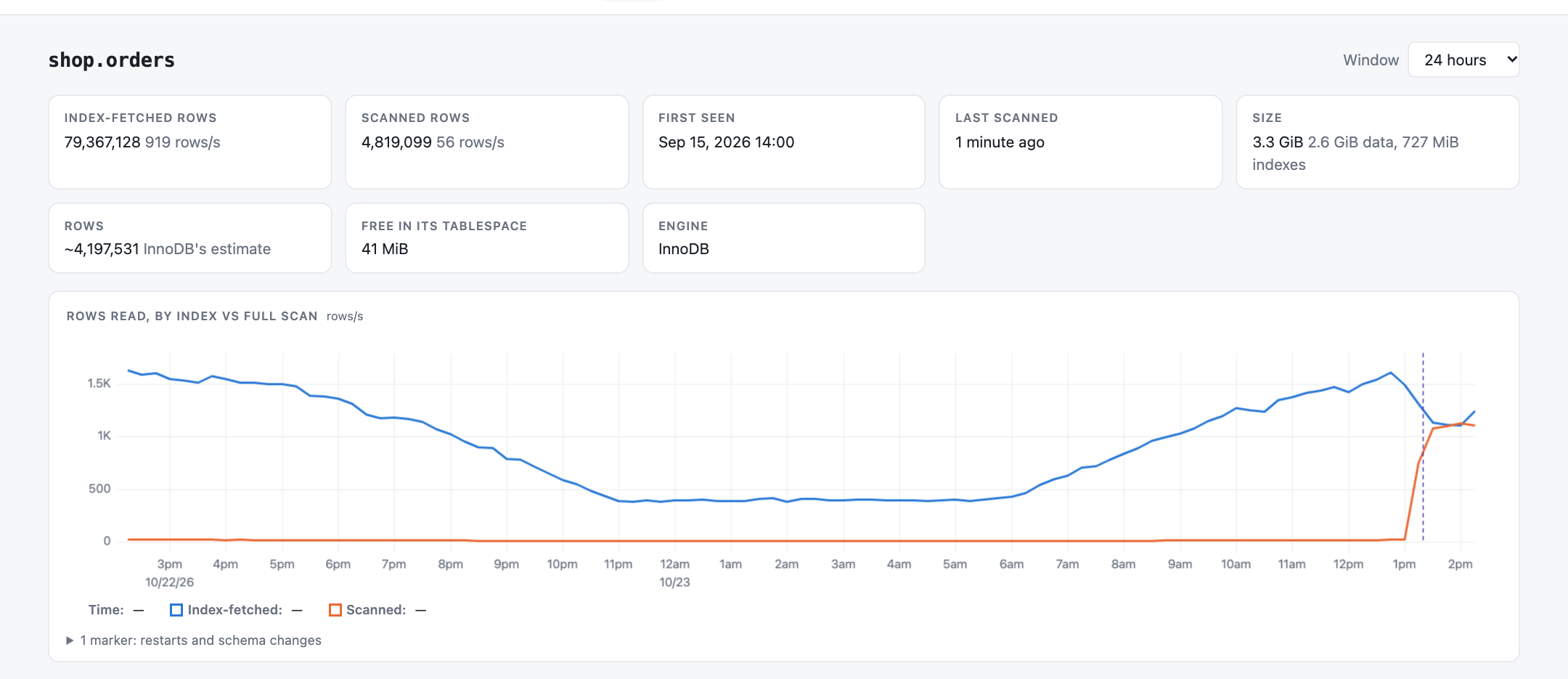
whereDate() deploy draws the same climb without one.Frequently asked questions
Does whereDate() use an index in Laravel?
Not on MySQL. whereDate() compiles to date(created_at) = ?, and an index on created_at holds created_at values, not their dates, so MySQL reads every row. Rewrite it as a range on the bare column, from the start of the day up to the start of the next, or add a functional index on (date(created_at)) with rawIndex(). MariaDB 11.1 and later rewrite DATE() comparisons into ranges themselves.
Why does whereBetween() with startOfDay() and endOfDay() return no rows?
Because both bounds are the same mutable Carbon object. startOfDay() and endOfDay() change the instance they are called on and return it, and Laravel only formats bindings when the query runs, so both bounds are sent as 23:59:59. Call copy() before each method, use CarbonImmutable, or call Date::use(CarbonImmutable::class) in a service provider.
Why is my Eloquent query not using the index?
Most often the column is wrapped in a function (whereDate, whereYear, whereMonth, whereToday and its siblings, or a JSON path like options->channel), a LIKE pattern starts with %, whereLike() is case-sensitive, or a PHP integer is compared with a VARCHAR column. Run explain() on the query: possible_keys NULL on an indexed column means the WHERE hides the index. For type conversions, run EXPLAIN and then SHOW WARNINGS in a MySQL client and look for warning 1739.
How do I index a JSON column for where('options->channel', ...) in Laravel?
Add an indexed generated column whose expression is exactly what Laravel sends: $table->string('channel', 10)->virtualAs(DB::getQueryGrammar()->wrap('options->channel'))->index(). MySQL then uses the index for the unchanged where('options->channel', ...). A column written with the ->> shorthand, options->>'$.channel', is stored with a different path and the query keeps scanning.
Does comparing a string column with an integer skip the index?
Yes. MySQL compares a VARCHAR column with a number as numbers, converting every row, so where('reference', 100042) reads the whole table, and it also matches values like 0100042 and 100042-B. Cast the value to a string before the query. A string compared with an integer column is fine: MySQL converts the one constant and uses the index.
Keep reading
9 min read
Introducing Sailfish: Your MySQL performance_schema, Charted Over Time
Sailfish charts MySQL performance_schema over time in your Laravel app: index reads, table scans, the server...
12 min read
Dispatching Laravel Jobs After the Transaction Commits
Why Laravel jobs dispatched in a transaction can run before it commits, and how afterCommit and...
9 min read
Why Our Laravel Response Cache Kept Missing: Click IDs, Cache Keys and a Cached noindex
Why spatie/laravel-responsecache kept missing: click ids splitting the cache, mismatched keys, clear()...
11 min read
Laravel Background Jobs: 12 Best Practices for Production Queues
Twelve practices for Laravel queued jobs in production: small arguments, idempotency, retries and backoff,...