18 Best Practices for Laravel Database Migrations
· 18 min read · Boring Observability
Verified against Laravel 13.43 · MySQL 8.0.46 · MySQL 8.4.13 · MariaDB 11.8 · PostgreSQL 16
A migration runs while the previous release is still reading and writing the table, and on MySQL nothing wraps it
in a transaction. Each statement commits on its own, and every ALTER TABLE has to wait for a metadata
lock behind the transactions already open on the table. A migration that passed every test can still break the
inserts of the release before it, or hold up every query on its table for as long as someone's transaction stays
open.
The rules below are for MySQL 8.0 and 8.4, with notes where MariaDB or PostgreSQL behave differently. They start with the ones nearly every app runs into and end with the ones that matter on large tables and busy servers.
1. Add columns nullable or with a default#
Most deploys run migrations while the previous release still serves requests, and queue workers run the old code
until they restart. A column added as NOT NULL without a default breaks every insert the old code
makes, with 1364 "Field 'channel' doesn't have a default value". Nullable, or with a default, the old code never
notices the column, and on current MySQL 8.0 and 8.4 the add is instant either way.
2. Rename or drop a column or table only after the code stops using it#
renameColumn() and dropColumn() break every query of the old release that names the
column, with 1054 "Unknown column", and Schema::rename() breaks every query on the table with 1146
"Table doesn't exist". To drop a column, first ship code that no longer uses it, then drop it in the next deploy or
after the rollout, as in rule 10. If the column is NOT NULL without a default, give it a default in
that first deploy, or the new code's inserts fail with 1364 until the drop. Changing only the default is instant:
$table->string('legacy')->default('')->change(), restating its other modifiers as rule 3 explains. A
column with a foreign key needs dropConstrainedForeignId(), since dropColumn() fails with
1828 while the key exists.
A rename takes more deploys, and so does a type change that rule 7 shows copying the table, such as an
unsignedInteger counter that needs to become unsignedBigInteger:
- Add the new column, nullable.
- Ship code that writes to both columns.
- Backfill the new column from the old one, in batches as in rule 5.
- Ship code that reads and writes only the new column.
- Drop the old column in the next deploy.
Renaming a table goes the same way, with a new table and writes to both.
3. Restate every modifier when you call ->change()#
Since Laravel 11, change() sends the whole column definition again, and any modifier you leave out is
dropped. Here is a migration meant only to widen a nullable column that has a default:
// The column: $table->string('code', 32)->nullable()->default('none');

$table->string('code', 60)->change();
// alter table `orders` modify `code` varchar(60) not null

$table->string('code', 60)->nullable()->default('none')->change();
// alter table `orders` modify `code` varchar(60) null default 'none'
The first one makes the column NOT NULL and removes its default. With a NULL in the column it fails
with 1138. Without one, MySQL rewrites every row to apply it, and from then on every insert that leaves
code out fails with 1364. Run php artisan migrate --pretend and read the
modify line before the deploy does.
4. One change per statement, or guard each step#
Laravel wraps a migration in a transaction only on PostgreSQL and SQL Server. On MySQL and MariaDB every statement
commits as soon as it finishes, and every blueprint command is a statement of its own, even when two commands share
a closure. When one fails partway through a migration, the statements before it stay applied, and Laravel records
nothing, because it writes the migrations row only after up() returns. The next
deploy runs the whole migration again and fails on its first statement. This one adds a column and a unique index:
Schema::table('contacts', function (Blueprint $table) {
    $table->timestamp('verified_at')->nullable();
    $table->unique('email');
});

// php artisan migrate --pretend:
// alter table `contacts` add `verified_at` timestamp null
// alter table `contacts` add unique `contacts_email_unique`(`email`)
If one email is duplicated, the index fails with 1062 and the column stays. Every later run then fails with 1060 "Duplicate column name 'verified_at'", even after the duplicate is gone, until someone drops the column by hand. Guard each step so that a rerun skips what already happened:
public function up(): void
{
    if (! Schema::hasColumn('contacts', 'verified_at')) {
        Schema::table('contacts', fn (Blueprint $table) => $table->timestamp('verified_at')->nullable());
    }

    if (! Schema::hasIndex('contacts', 'contacts_email_unique')) {
        Schema::table('contacts', fn (Blueprint $table) => $table->unique('email'));
    }
}
A guard should skip a step, never undo one. Schema::dropIfExists() ahead of Schema::create()
also lets a rerun pass, by deleting the table and every row in it on any database where it already exists.
The alternative is one ALTER TABLE through DB::statement(), as rule 11 uses, which applies
everything or nothing. On PostgreSQL the transaction rolls the column back, and once the data is fixed the rerun
just works.
Better still, find the duplicates before the deploy does:
DB::table('contacts')->select('email')->groupBy('email')->havingRaw('count(*) > 1')->limit(10)->pluck('email');5. Backfill in batches, not in one UPDATE#
Filling a new column with one DB::table('orders')->update([...]) makes one statement, and one
transaction, of the whole table. It keeps every row it has changed locked until the last one is done, so a request
or job that writes to one of those rows waits, and fails with 1205 after innodb_lock_wait_timeout, 50
seconds by default. A replica applies it as one transaction too, once the primary has finished, and falls behind by
about as long as it took. Update a batch at a time instead, so that each transaction is short:
DB::table('orders')
    ->whereNull('currency')
    ->chunkById(1000, function ($orders) {
        DB::table('orders')->whereIn('id', $orders->pluck('id'))->update(['currency' => 'EUR']);

        usleep(100_000);
    });
chunkById() pages by primary key, so rows that stop matching whereNull('currency') once
they're updated don't make it skip others, as chunk() would. Since it only picks up rows that are still
NULL, a backfill that stops halfway can simply run again. The pause between batches gives replicas time to apply
each one, so a replica that serves the app's reads doesn't fall behind.
On a large table, run it from a command or a queued job after the deploy, so the deploy doesn't wait on it. If it
stays in a migration, use the query builder rather than the model: the migration still has to run on a fresh
database years later, after the model has changed or gone, and saving models one at a time fires their events and
observers. Make the column NOT NULL in a later migration, once every row has a value.
6. Run the migration against a copy of production first#
A migration that finishes in a second on a development database can run for an hour on the production table.
Restore a recent snapshot and run it there before the deploy does, and check what
php artisan migrate --pretend prints against the table in rule 7.
Deploy tools such as Forge and Laravel Cloud stop a deploy that runs past their time limit, and the old release
keeps serving. If that happens mid-migration, MySQL still finishes the ALTER it was running, so the old
release ends up on the new schema, which rules 1 and 2 are there to make safe. Keep the long work out of the deploy:
a backfill goes in a command or a queued job, as in rule 5, and a table copy in one of the tools from rule 7.
7. Know which changes copy the table#
MySQL picks the cheapest algorithm a change allows. INSTANT edits the table's definition only.
INPLACE works inside InnoDB, and every in-place change below lets writes continue, though some still
rewrite every row. COPY builds a new table row by row and, on MySQL, blocks writes until it's done.
Common Laravel changes:
| Laravel change | MySQL 8.0 and 8.4 | MariaDB 11.8 |
|---|---|---|
Add a column: nullable, with a default, or ->after() | INSTANT | INSTANT |
change() the default only | INSTANT | INSTANT |
| Drop or rename a column | INSTANT | INSTANT |
change() string('code', 32) to 60 | INPLACE, no rows touched | INSTANT |
change() string('code', 32) to 64 | COPY, writes blocked | COPY, writes allowed |
change() unsignedInteger to unsignedBigInteger | COPY, writes blocked | COPY, writes allowed |
change() nullable to NOT NULL | INPLACE, every row rewritten | INPLACE |
index() or unique() | INPLACE, writes allowed | NOCOPY, writes allowed |
foreign() or foreignId()->constrained() | COPY, writes blocked | COPY, writes allowed |
dropIndex() | INPLACE | NOCOPY |
timestamp('seen_at')->useCurrent() | INSTANT | INSTANT |
Add a column with a constant expression default, ->default(new Expression('(0)')) | COPY, writes blocked | INSTANT |
virtualAs() | INSTANT | INSTANT |
storedAs() | COPY, writes blocked | COPY, writes allowed |
id() on a table without a primary key | INPLACE, writes blocked | INPLACE, writes blocked |
The VARCHAR rows are the ones that catch people out. With utf8mb4 a character can take four bytes, and
past 255 bytes the length prefix grows from one byte to two, which means rewriting every row. Up to 63 characters
stays in place, and so does going from 255 to 500, where the prefix is two bytes already. A foreign key copies the
table while foreign_key_checks is on, which rule 8 avoids, and foreignId()->constrained()
is two statements: an instant column add, then the copy. MariaDB accepts LOCK=NONE for its copies, so
writes carry on while it rewrites the table.
The NOT NULL row assumes Laravel's default 'strict' => true, under which a NULL left in the
column fails the change with 1138 "Invalid use of NULL value" and leaves the table as it was. With
'strict' => false, Laravel sets sql_mode to NO_ENGINE_SUBSTITUTION, and MySQL
copies the table instead, with writes blocked, turning every NULL into an empty string or a zero. MariaDB makes the
same conversion in place.
On MySQL a json or text column can only take a default written as an expression, such as
->default(new Expression('(JSON_ARRAY())')), and adding a column with an expression default copies the
table even when the expression is a constant. A nondeterministic one such as (uuid()) is refused
outright with 1674 "Statement is unsafe" while binary logging is on, which it is by default. Add these columns
without a default and let the model fill new rows, through $attributes or HasUuids.
A virtualAs() column is computed when it's read, so adding one is instant, and InnoDB can index it. A
storedAs() column is written into every row, which takes a copy. Adding id() to a pivot
table that never had one rebuilds the table with writes blocked, and under statement-based replication the replicas
can number the rows differently from the primary.
For the changes that block writes on a big table, gh-ost and pt-online-schema-change build the altered copy beside it while writes continue, and swap it in with a rename at the end. If you run a change through one of them, guard the migration that makes the same change, as in rule 4, so the deploy skips it.
8. Add foreign keys with the checks off, once the data is clean#
With foreign_key_checks on, MySQL adds a foreign key by copying the table, and writes wait until the
copy is done. With it off, the key goes in place, along with the index it needs, and writes carry on. What MySQL
skips with the checks off is checking the rows already in the table, so check them yourself first:
public function up(): void
{
    $orphans = DB::table('orders')
        ->leftJoin('users', 'users.id', '=', 'orders.user_id')
        ->whereNotNull('orders.user_id')
        ->whereNull('users.id')
        ->count();

    if ($orphans > 0) {
        throw new RuntimeException("{$orphans} orders point at a user that doesn't exist");
    }

    Schema::withoutForeignKeyConstraints(function () {
        Schema::table('orders', fn (Blueprint $table) => $table->foreign('user_id')->references('id')->on('users'));
    });
}
withoutForeignKeyConstraints() turns the checks back on when the closure returns, even if it throws.
A row orphaned between the count and the end of the ALTER stays in the table unnoticed, since nothing
checks it later. MySQL also extends the ALTER's metadata locks to the parent table, so an idle
transaction on users can hold it up as well, and the timeout from rule 14 belongs here too.
9. Run migrations once, and check what --isolated returns#
With several servers each running php artisan migrate, --isolated takes a lock in the
default cache store so that only one of them runs, which means every server has to use the same store, such as the
database or Redis rather than file. The server that loses doesn't wait. It prints "The [migrate]
command is already running." and exits 0, and its deploy carries on before the schema is finished.
--isolated=75 makes it exit 75 instead, which a deploy script can treat as a reason to wait.
A deploy killed during a migration keeps the lock for an hour, and every deploy in that hour exits 0 without
migrating anything. MySQL meanwhile finishes the ALTER the killed process started, so the change is
there and the migrations row isn't, and the next real run fails, for an index with 1061 "Duplicate key
name". Cache::lock('framework/command-migrate')->forceRelease() clears the lock, and the guards from
rule 4 let the rerun through.
10. Run destructive migrations after the release is live#
Rule 2 puts a deploy between the code that stops using a column and the migration that drops it. A second folder
lets both ship in one release. A plain php artisan migrate only reads the top level of
database/migrations, so migrations in database/migrations/post-deploy wait for a separate
step, which the deploy runs once the new release is live and every queue worker has restarted onto it:
php artisan migrate --force
# activate the release, run php artisan queue:restart and wait for the workers
php artisan migrate --path=database/migrations/post-deploy --force
Local databases and tests still need those migrations, so register the folder for them:
// AppServiceProvider::boot()
if ($this->app->environment('local', 'testing')) {
    $this->loadMigrationsFrom(database_path('migrations/post-deploy'));
}
Make the first step of a drop a rename. Renaming a column or a table is instant on MySQL 8, and code that still
uses it fails either way, but renaming it back undoes the damage at once, where a dropped column is gone. Rename
legacy to legacy_drop_20261123 after the rollout, and drop it a week later.
11. Swap an index in one ALTER TABLE#
Because every blueprint command commits on its own (rule 4), this migration, which moves a unique key onto a new column, runs as three commits:
Schema::table('stats_rollup', fn (Blueprint $table) => $table->string('direction', 8)->default('outbound'));
Schema::table('stats_rollup', fn (Blueprint $table) => $table->dropUnique('stats_bucket_unique'));
Schema::table('stats_rollup', fn (Blueprint $table) => $table->unique(['bucket', 'channel', 'host', 'direction'], 'stats_bucket_unique'));
Between the second and the third, the table has no unique key. On MySQL, upsert() sends
INSERT ... ON DUPLICATE KEY UPDATE, which updates a row only when the insert collides with a unique key,
so every upsert in that window inserts new rows. When the third statement builds the new index, those duplicates are
already in the table and it fails with 1062. The table keeps the new column but has lost its unique key, and the
upserts go on inserting duplicates until someone notices.
MySQL can drop an index and add another in a single statement, and a statement that fails applies none of its changes:
public function up(): void
{
    Schema::table('stats_rollup', function (Blueprint $table) {
        $table->string('direction', 8)->default('outbound');
    });

    DB::statement('ALTER TABLE stats_rollup
        DROP INDEX stats_bucket_unique,
        ADD UNIQUE KEY stats_bucket_unique (bucket, channel, host, direction)');
}
The old key keeps rejecting duplicates until the statement finishes, and writes carry on while the new index is built.
On PostgreSQL#
Laravel's transaction keeps the three statements atomic there, and upserts wait for the table lock instead of
inserting duplicates. Two things still catch people out. upsert() sends ON CONFLICT (bucket,
channel, host), and PostgreSQL rejects a conflict target that doesn't match a unique index exactly, so code
still naming the old columns fails with 42P10 from the moment the key changes. The code change has to
ship with the migration.
The other is the usual advice to build the index with ->online() and
public $withinTransaction = false;, since CREATE INDEX CONCURRENTLY can't run inside a
transaction. Laravel then drops the constraint before it builds the new index, and for the whole build no unique
index matches either column list, so every upsert fails. Build the new index under a temporary name first, and swap
the constraint in a short transaction:
public $withinTransaction = false;

public function up(): void
{
    Schema::table('stats_rollup', fn (Blueprint $table) => $table->string('direction', 8)->default('outbound'));

    DB::statement('CREATE UNIQUE INDEX CONCURRENTLY stats_bucket_unique_new
        ON stats_rollup (bucket, channel, host, direction)');

    DB::transaction(function () {
        DB::statement('ALTER TABLE stats_rollup DROP CONSTRAINT stats_bucket_unique');
        DB::statement('ALTER TABLE stats_rollup
            ADD CONSTRAINT stats_bucket_unique UNIQUE USING INDEX stats_bucket_unique_new');
    });
}
ADD CONSTRAINT ... USING INDEX renames the index after the constraint, so the table ends up with the
same names as before.
12. Make an index invisible before you drop it#
An index that looks unused may be the one a monthly report depends on. sys.schema_unused_indexes lists
the indexes nothing has read since the server last started, which misses anything rarer than that. On MySQL 8, hide
the index before dropping it:
DB::statement('ALTER TABLE orders ALTER INDEX orders_status_index INVISIBLE');
The optimizer stops using it while writes keep it up to date, so if a query slows down, VISIBLE brings
it back without a rebuild. Drop it once every report and job has run without it. Laravel has no blueprint method
for this, and MariaDB calls the same thing IGNORED.
13. Make MySQL refuse a copy with ->instant()#
Laravel can name the algorithm, and MySQL then refuses the change instead of falling back to a slower one. On a
column, ->instant() adds ALGORITHM=INSTANT:
$table->string('note')->nullable()->instant();

$table->unsignedBigInteger('qty')->default(0)->instant()->change();
// SQLSTATE[0A000]: 1846 ALGORITHM=INSTANT is not supported.
// Reason: Need to rebuild the table to change column type. Try ALGORITHM=COPY/INPLACE.
An error on the first deploy is easier to deal with than a copy nobody knew was a copy. ->lock('none')
on a foreign key fails the same way, saying that adding foreign keys needs foreign_key_checks=OFF, and
on an index, ->inplace()->lock('none') asks for an online build. A stronger lock works the other way:
->lock('shared') blocks writes for the whole change, and ->lock('exclusive') blocks reads
as well.
Instant changes have a limit. MySQL keeps 64 row versions per table, counted in TOTAL_ROW_VERSIONS in
information_schema.innodb_tables, and each instant column add uses one. Past the limit,
->instant() fails with 4092 "Maximum row versions reached", while a plain add quietly rebuilds the
table and resets the count.
14. Give up on a metadata lock after a few seconds#
Every query takes a shared metadata lock on the tables it uses and keeps it until its transaction ends.
ALTER TABLE needs an exclusive one, even an instant ALTER that only edits the table's
definition, and while it waits for it, every new query on the table queues behind it. One idle transaction that
read the table is enough to stop every read: a tinker session left inside
DB::beginTransaction(), or a job that calls an HTTP API inside DB::transaction(). In
SHOW PROCESSLIST the ALTER and every query after it sit in "Waiting for table metadata
lock", and the session holding them all up shows as Sleep.
MySQL lets the ALTER wait for lock_wait_timeout, which defaults to a year on 8.0 and 8.4
and to a day on MariaDB 11.8. innodb_lock_wait_timeout covers row locks and plays no part here. Lower
the timeout for the migration's own session, and retry when the ALTER gives up with error 1205:
use Illuminate\Database\QueryException;

public function up(): void
{
    $previous = DB::scalar('SELECT @@SESSION.lock_wait_timeout', useReadPdo: false);
    DB::statement('SET SESSION lock_wait_timeout = 3');

    try {
        retry(5, function () {
            Schema::table('stats_rollup', fn (Blueprint $table) => $table->string('note')->nullable());
        }, 2000, fn ($e) => $e instanceof QueryException && ($e->errorInfo[1] ?? null) === 1205);
    } finally {
        DB::statement('SET SESSION lock_wait_timeout = '.(int) $previous);
    }
}
Each attempt holds the queue for three seconds at most. If the transaction never ends, the migration fails after
five attempts and the deploy stops, which is better than a site waiting on it. Keep one statement inside each
retry(): a 1205 means that statement changed nothing, but retrying a closure that already ran an
earlier statement runs that one twice. Put the previous value back in finally, because every migration
in the run shares the connection.
15. Expect an online index build to lock twice#
With ->inplace()->lock('none'), MySQL builds an index while writes carry on, but the metadata lock is
still taken at the start and again at the end. A transaction that is open at either moment holds every query on
the table until it commits, and on a long build, a transaction that started during it can still be open when it
ends.
The timeout from rule 14 bounds both waits, at a price: a timeout at the end throws away the finished build, and the retry builds the index again from the start. On a table that takes minutes to index, keep the timeout and run the migration when no long transactions are expected, outside the hours of reports and exports.
16. Give migrations their own database user#
The app reads and writes rows, and only migrations change tables. Run them as a user granted everything on the
database, and give the app's own user SELECT, INSERT, UPDATE and
DELETE. A Schema::drop() typed into tinker on production then fails with 1142 "DROP command
denied" instead of dropping the table. The migration user gets a connection of its own:
// config/database.php, next to 'mysql'
'mysql_migrations' => [
    'driver' => 'mysql',
    'host' => env('DB_HOST', '127.0.0.1'),
    'database' => env('DB_DATABASE', 'laravel'),
    'username' => env('DB_MIGRATIONS_USERNAME'),
    'password' => env('DB_MIGRATIONS_PASSWORD'),
    // ...the other keys as in 'mysql'
    'options' => [
        Mysql::ATTR_INIT_COMMAND => 'SET SESSION lock_wait_timeout = 10',
    ],
],
php artisan migrate --database=mysql_migrations --force makes it the default connection while
migrations run, so the Schema:: and DB:: calls inside them use it. The init command gives
every migration a ten-second limit on metadata lock waits, including the ones written without rule 14, and the
same option on the app's connection limits how long a request waits behind any ALTER, including one
someone runs by hand.
Laravel can also refuse the commands that empty a database. In AppServiceProvider::boot():
DB::prohibitDestructiveCommands($this->app->isProduction());
On production, db:wipe, migrate:fresh, migrate:refresh,
migrate:reset and migrate:rollback then print "This command is prohibited from running in
this environment." and exit with a failure, --force or not. A bad migration on production is fixed with
a new one rather than a rollback: down() rarely runs anywhere but a developer's machine, and rolling
back a migration that added a column throws away everything written to it since.
17. Lint migrations, and know what the linter can't see#
Migration linters catch the common cases. Most flag a dropped column, and catidegla/safe-migrations and
pushery/sqlens-for-laravel (from --level=3) flag a migration that never sets
lock_wait_timeout. None of the nine that install on Laravel 13 flags the index swap from rule 11.
heyosseus/difflock comes closest, rating the dropUnique() high risk because rows the key would have
rejected are accepted while it is gone.
Prefer one that works from the SQL Laravel would run, as alexisgeneau/laravel-strict-migrations and
hamza-wakrim/laravel-safe-migrations do. Those see a migration however it is written, while some of the linters
that parse the PHP miss a Schema::connection() held in a variable or a table name behind a helper
method. Check a raw DB::statement(), like the one in rule 11, against the table in rule 7 yourself.
18. Watch for blocked sessions on production#
From the app's side, a migration waiting on a metadata lock looks like one table that stopped answering.
Sailfish reads it from performance_schema in your Laravel app. Its
Activity page draws who is blocking whom as a tree, with the ALTER under the idle transaction it waits
for and the queries queued behind the ALTER beneath it, and flags transactions left idle. With the
events_stages_current consumer on, which MySQL leaves off and which costs next to nothing, it also
shows how far a running ALTER TABLE has got. When a session has waited 30 seconds by the time
detection runs, every five minutes, a Sessions blocked event names the idle session holding everyone up and gives
the KILL that ends it. That event needs the events_waits_current consumer on.
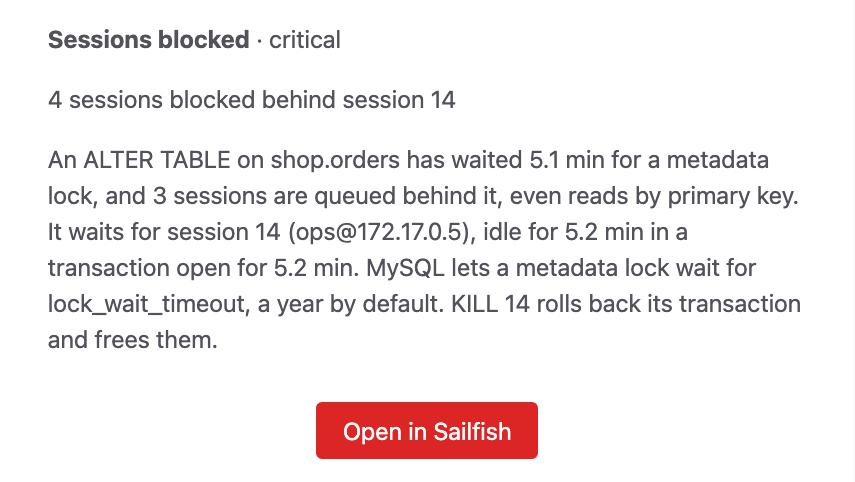
ALTER TABLE behind an idle transaction.Frequently asked questions
Does Laravel run migrations in a transaction on MySQL?
No. The migrator wraps a migration in a transaction only when the schema grammar supports it, which is PostgreSQL and SQL Server. MySQL and MariaDB commit each ALTER TABLE as soon as it finishes, and every command in a Schema::table() closure is its own statement, so a migration that fails halfway leaves the earlier statements applied and no row in the migrations table.
Why does ->change() remove nullable or the default from my column?
Since Laravel 11, change() sends the whole column definition again as a MODIFY statement, and any modifier you leave out is dropped. $table->string('code', 60)->change() on a nullable column with a default makes it NOT NULL with no default, which fails if the column holds a NULL and otherwise breaks inserts that leave the column out. Restate every modifier you want to keep, and check the SQL with php artisan migrate --pretend.
How do I change a unique index on a busy MySQL table without downtime?
Drop the old key and add the new one in a single statement: DB::statement('ALTER TABLE stats_rollup DROP INDEX stats_bucket_unique, ADD UNIQUE KEY stats_bucket_unique (bucket, channel, host, direction)'). The old key keeps rejecting duplicates until the statement finishes, and writes carry on meanwhile. With dropUnique() and unique() as separate calls, the table has no unique key in between, and upserts insert duplicates that make the new key fail.
Why does my Laravel migration hang and block every query on the table?
The ALTER TABLE is waiting for a metadata lock held by a transaction that used the table and has not committed, often one sitting idle. While it waits, every new query on the table queues behind it, and MySQL lets it wait for lock_wait_timeout, a year by default. Run SET SESSION lock_wait_timeout = 3 in the migration and retry on error 1205, so it gives up within seconds and tries again.
What does ->instant() do in a Laravel migration?
It adds ALGORITHM=INSTANT to the column's ALTER TABLE on MySQL. If MySQL cannot make the change without rebuilding the table, such as changing an int to a bigint, the statement fails with error 1846 instead of quietly copying the table. Adding, dropping or renaming a column and changing only its default are instant on MySQL 8.0 and 8.4.
How do I add a foreign key to a large MySQL table without blocking writes?
Check for orphaned rows first, with a left join that finds child rows whose parent is missing, then add the key inside Schema::withoutForeignKeyConstraints(). With foreign_key_checks on, MySQL copies the table to add a foreign key and blocks writes until it is done. With it off, the key and its index are added in place while writes continue, but MySQL does not check the rows already there, which is why the orphan check comes first.
How should I backfill a new column in a Laravel migration?
In batches, not with one update() over the whole table. One UPDATE is one transaction that keeps every changed row locked until it finishes, so writes to those rows wait and can fail with error 1205, and replicas fall behind. Use chunkById() with whereNull() on the new column, so each batch is a short transaction and a backfill that stops can run again, and on a large table run it from a command or queued job after the deploy.
Does migrate --isolated stop two servers running migrations at the same time?
Yes, when every server uses the same cache store, such as the database or Redis. The second server does not wait: it prints that the command is already running and exits 0, or with the code you pass as --isolated=N. A deploy killed during a migration leaves the lock for an hour; Cache::lock('framework/command-migrate')->forceRelease() clears it.
My migration failed halfway on MySQL. How do I run it again?
Find out what it applied: migrate --pretend lists its statements and SHOW CREATE TABLE shows the table. Undo those statements by hand, or guard each step with Schema::hasColumn() or Schema::hasIndex() so the rerun skips them, and fix the data that made it fail. Rerunning it unchanged fails on the first statement that already ran, for example with 1060 Duplicate column name.
Keep reading
11 min read
Laravel Background Jobs: 12 Best Practices for Production Queues
Twelve practices for Laravel queued jobs in production: small arguments, idempotency, retries and backoff,...
11 min read
whereDate() and Other Eloquent Calls That Quietly Skip Your MySQL Index
Laravel's whereDate(), whereYear(), whereToday(), leading-% LIKE, int vs string and JSON wheres skip MySQL...
9 min read
Introducing Sailfish: Your MySQL performance_schema, Charted Over Time
Sailfish charts MySQL performance_schema over time in your Laravel app: index reads, table scans, the server...
12 min read
Dispatching Laravel Jobs After the Transaction Commits
Why Laravel jobs dispatched in a transaction can run before it commits, and how afterCommit and...