Failure detection
Connection errors, HTTP errors, the 200 OK with an error in the body that only your callback can spot, and calls that fail every time they are made.
Every recorded call is either a success or one of three failure types. They are stored separately because they mean different things: a connection error is usually the network or the vendor being down, an HTTP error is the vendor refusing the request, and an application error is the vendor answering normally while telling you it did not work.
| failure_type | When | Status | Message |
|---|---|---|---|
connection_error |
No response arrived, or one started and the transfer failed part-way through its body | none | The cause, where cURL reports one: Timed out, DNS resolution failed, Timed out (after HTTP 200 headers) |
http_error |
A response with status 400 or above | the status | HTTP 503 Service Unavailable |
application_error |
A response below 400 that your detector flagged | the status, usually 200 | Whatever your detector returned |
They are checked in that order, and the first that applies wins. A failed call also stores its response body (see below). A successful call stores none, unless you turn success bodies on for its API.
A response whose headers arrived but whose body was cut off by a timeout or a dropped connection is a
connection_error, not a success with the status it started with. It has no status code, so a filter
on 200 finds only the responses that arrived whole, and the status is kept in the message instead.
Half a body is not an answer, so it is neither passed to your detector nor stored.
Connection errors#
A transfer that never produced a response still reaches Guzzle's on_stats hook, with cURL's error
number attached. Requizon turns the common ones into a readable cause, which is what lets the failures list tell a
DNS problem from an expired certificate from a vendor that simply stopped answering:
| cURL error | Recorded as |
|---|---|
| 5, 6 | DNS resolution failed (proxy), DNS resolution failed |
| 7 | Connection refused |
| 28 | Timed out |
| 35 | TLS handshake failed |
| 51, 58, 60, 83 | A TLS certificate problem, named by kind |
| 52 | Empty response from server |
| 55, 56 | Network send error, Network receive error |
Any other number is recorded as cURL error N. A timeout's duration is the time until cURL gave up, which
is roughly your client's timeout(). On a chart of response times that shows up as a spike, and it is
real: that is how long your code waited.
A message that quotes the URL keeps it without its query string or any credentials in it, so an API key passed as
?key= does not reach the table through an error message.
200 OK, with the error in the body#
Plenty of APIs answer 200 OK and put the failure in the payload. Recorded by status alone, those calls
count as successes, and a dashboard showing 100% success for an integration that is failing is worse than no
dashboard. Register one detector, in the boot() method of your RequizonServiceProvider, that
knows what failure looks like for each API:
use BoringO11y\Requizon\Requizon;

public function boot(): void
{
    parent::boot();

    Requizon::detectFailuresUsing(function ($body, $response, $request) {
        return match ($request->getUri()->getHost()) {
            'ws.nausys.com' => is_array($body) && ! empty($body['errorCode'])
                ? trim("error {$body['errorCode']} ".($body['errorMessage'] ?? ''))
                : null,
            'maps.googleapis.com' => is_array($body) && ! in_array($body['status'] ?? 'OK', ['OK', 'ZERO_RESULTS'], true)
                ? $body['status']
                : null,
            'soap.example.com' => is_string($body) && str_contains($body, '<soap:Fault>')
                ? 'SOAP fault'
                : null,
            default => null,
        };
    });
}
It is called with three arguments:
-
$body: the decoded array when the response'sContent-Typecontainsjsonand the body decodes to an array, and the raw string otherwise $response: the PSR-7 response, for headers and the status code$request: the PSR-7 request, for the host, path and method
Return a non-empty string to record the call as an application_error with that string as its message.
Return null (or an empty string) to record it as a success. Keep messages short and stable, like an error
code: the failures list is easier to scan when the same failure always reads the same way.
What registering a detector costs#
With a detector registered, Requizon reads the body of every response that was not already a failure, so it can pass it in. Without one, it never reads a successful body. The read is bounded and put back:
-
At most
recording.response_body_read_bytes(256 KB) is read, orresponse_body_max_bytesif you have set that higher. A larger JSON response arrives cut off, fails to decode, and is passed as a string, so a detector for an API with large payloads should checkis_array($body)before indexing into it, as above. Raise the limit if the APIs you watch answer with more. It is separate frommax_body_read_bytes, the limit on request bodies, so raising it does not start reading uploads. - An integer too large for PHP arrives as a string of its digits rather than a rounded float, so an order id compared against your own records still matches.
- The stream is put back where it was afterwards, so
$response->json()in your own code still sees the whole body. -
A body that cannot be rewound is not read at all. A request made with
stream => truegives exactly that, a stream over the remote resource, and reading it would hand your code an empty download. Streamed responses are recorded, but without failure detection. -
Nor is a response written to a
sinkyou supplied (Http::sink(), or Guzzle'ssinkoption). That is your file or stream, and it may hold more than this response.
The detector runs inside recording, and recording never lets an exception reach your call. If the detector throws
(an undefined index on an unexpected payload is the usual one), the exception is reported to your exception
handler and that call is not recorded at all. Write it defensively, and return null for anything it
does not recognise.
The stored response body#
Every failed call stores its response body in requizon_http_requests.response_body, up to
recording.response_body_max_bytes (64 KB). Anything longer is cut, after redaction, and ends in
…[truncated]. The
requests list shows it under Details, next to the failure message, the query and body parameters and
the response headers, so you debug against what the API actually sent at the moment it failed.
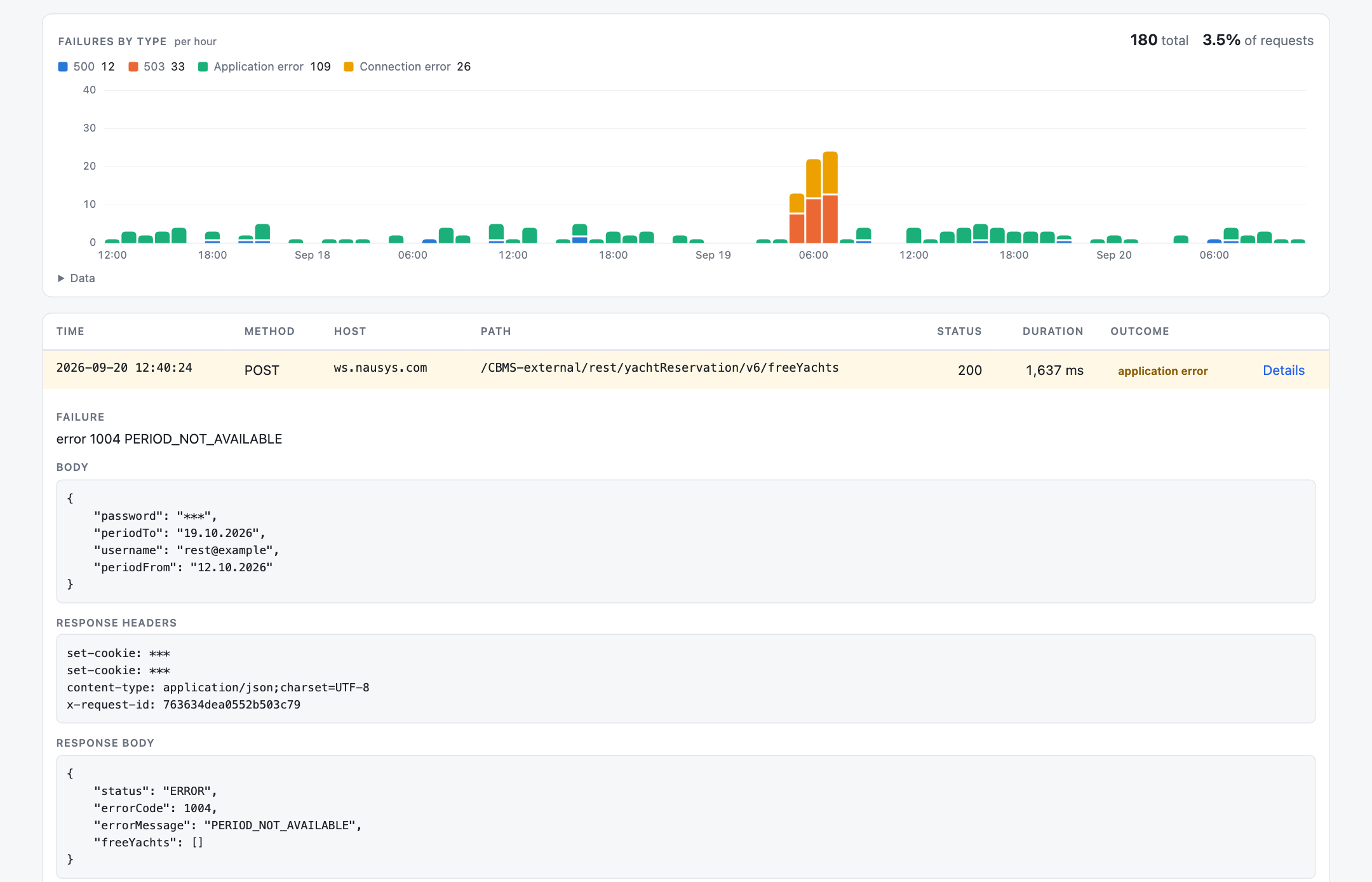
A body that parses as JSON or as a form goes through the same redaction as the request parameters, and one that does not (XML, plain text, or a body past the read limit, which is cut before it is read) is stored as it came. Redaction and stored data explains what that means for how long you keep it. A connection error has no body to store, including one that had started to receive a response.
A failure whose Content-Type is a file type (image/*, video/*,
audio/*, application/pdf, application/octet-stream) is still read. When the
body turns out to be text, as the JSON error a download endpoint sends under the file's type usually is, it is
stored like any other failure's body. One that really is binary is stored as its type and size,
{"_unparsed": "image/png, 48213 bytes"}.
Calls that fail every time#
A path's failure count cannot tell a flaky endpoint from one bad call made over and over: a wrong id, a malformed filter, an account that was closed. So every call is also fingerprinted by its method, host, raw path and redacted query and body, and an API's paths page lists the fingerprints whose every attempt in the window failed, timeouts included, with a link to the attempts.
A call is listed once it has failed three times, with the first and last attempt at least ten minutes apart, so one
call retried in a burst is not mistaken for a pattern. A retry middleware's attempts are each a call of their own,
which is why the span matters. The search reads the detail rows, so it reaches back no further than
retention.detail_days.
// config/requizon.php
'fingerprint' => [
    'ignore' => ['timestamp', 'nonce', '*_request_id'],
    'min_attempts' => 3,
    'min_span_minutes' => 10,
    'max_results' => 100,
],-
Parameters that change on every call, a timestamp or a nonce, give every call a fingerprint of
its own. List them in
ignore, asStr::is()patterns matched whatever their case and at any depth. Redacted parameters are***on every call already. -
A body that does not parse into parameters (XML, SOAP, multipart) is fingerprinted by its raw
bytes, so anything in it that changes per call splits it. A body too large to read
(
recording.max_body_read_bytes), or in a stream that cannot be rewound, leaves the call without a fingerprint and off the list.
Each call is listed by the raw path of its latest attempt, masked as it was stored, with the path it is counted
under on hover. To decide yourself what makes two calls the same, register a callback that returns any identifying
string, or null to fall back to the built-in fingerprint. A callback that throws is reported and falls
back too:
use BoringO11y\Requizon\Requizon;
use Psr\Http\Message\RequestInterface;

Requizon::fingerprintUsing(function (RequestInterface $request, string $api): ?string {
    return $api === 'search' ? $request->getUri()->getPath() : null;
});
The same fingerprint links a failure's Details to all requests with these parameters on the requests list, so whether a retry of that call went through is one click away.
Finding failures on the dashboard#
An API's requests page has a Failures link, and its filter narrows the list to one failure type or
one status code. The responses chart follows the filter, so filtering to connection_error charts only
connection errors per hour, and an outage stands out rather than sitting on top of thousands of successes. See
The dashboard.